Next.js 与 SSR / SSG 模式
Next.js 基础用法
支持 CSS
方法 1:全局引入
pages/_app.js 中全局引入 css。
方法 2: css module
命名规范: [name].module.css
优点:
- 类名只在当前组件中有效
- 加载最少 css 资源
1
2
3
4
5
6
import styles from './Button.module.css'
export function Button() {
  return (
    // ...
  )
}
方法 3: 预处理器
支持 sass、less、stulus
方法 4: css in js(不推荐)
1
2
3
4
5
6
7
8
9
10
11
12
13
14
15
16
17
18
19
20
21
22
23
24
25
26
function HelloWorld() {
  return (
    <div>
      Hello world
      <p>scoped!</p>
      <style jsx>{`
        p {
          color: blue;
        }
        div {
          background: red;
        }
        @media (max-width: 600px) {
          div {
            background: blue;
          }
        }
      `}</style>
      <style global jsx>{`
        body {
          background: black;
        }
      `}</style>
    </div>
  )
}
静态文件
放置在 /public/ 目录下,访问路径是 “根路由 + 文件相较于 public 目录的路径”。
全局环境变量
两种管理和注入方法:
cross-env 库注入
1
  npx cross-env NEXT_PUBLIC_EXAMPLE_KEY=my-value next de
.env文件进行管理(推荐)1 2
API_KEY='my-secret-api-key' NEXT_PUBLIC_APP_LOCALE='en-us'
关于 .env 文件,nextjs 还支持以下玩法:
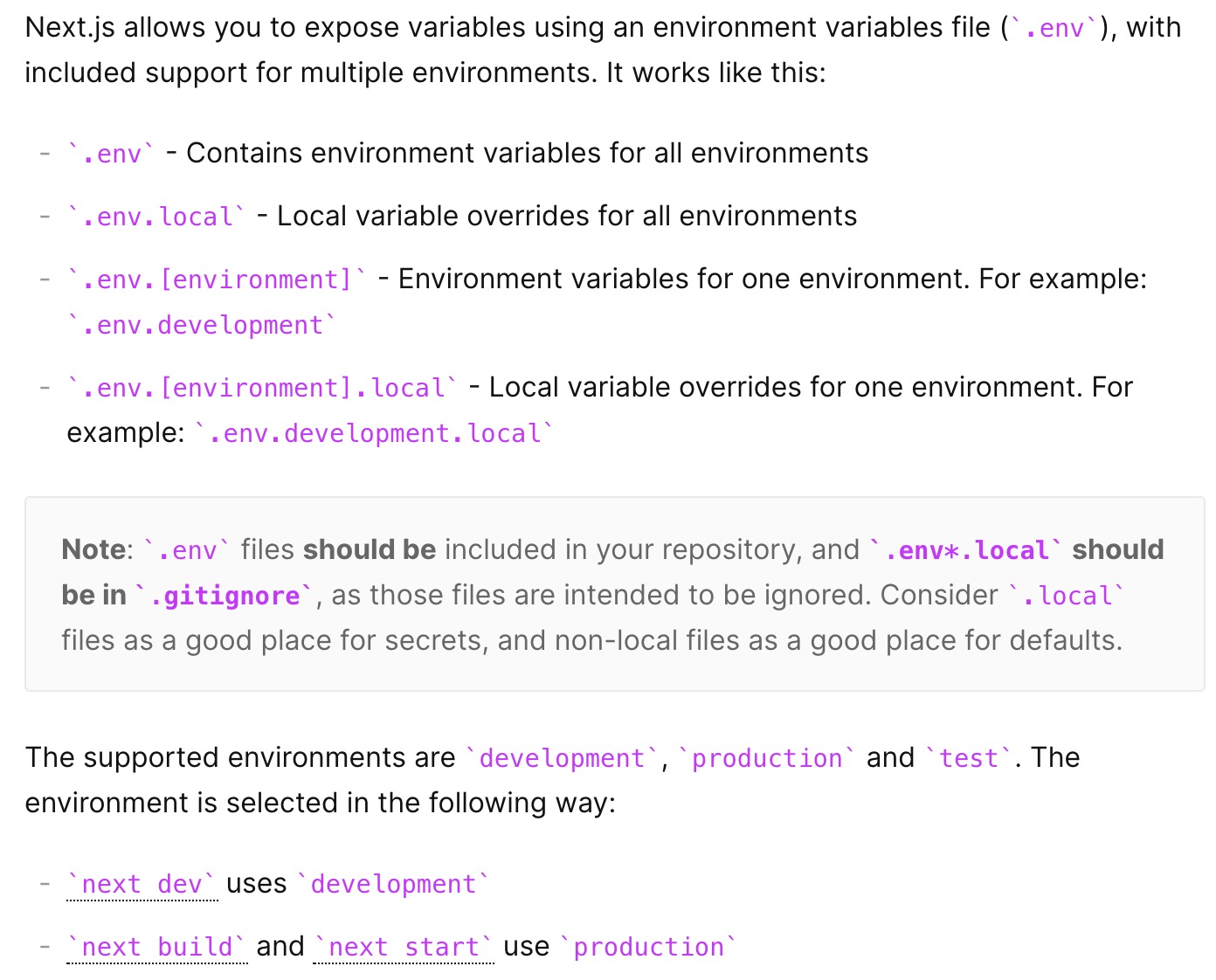
Next.js 路由
使用方法
- 支持动态路由
- 提供了
next/link库 - 支持 Shallow routing
1
2
3
4
5
6
7
8
9
10
11
12
13
14
15
16
17
18
19
20
21
22
23
24
25
26
27
28
29
30
31
import React, { useState, useEffect } from "react";
import Link from "next/link";
import Router, { useRouter } from "next/router";
const HomePage = () => {
  const router = useRouter();
  useEffect(() => {
    router.push("/home?counter=10", undefined, { shallow: true });
  }, []);
  useEffect(() => {
    // The counter changed!
  }, [router.query.counter]);
  return (
    <div>
      <div>Home Page!</div>
      <Link href="/posts/[id]" as="/posts/1">
        <a>跳转到动态路由</a>
      </Link>
      <Link href="/blog">
        <a>next/router的Link标签:Blog</a>
      </Link>

      <a href="/blog" target="_self">
        普通a标签:Blog
      </a>
      <button onClick={() => Router.push("/blog")}>
        next/router编程式跳转:Blog
      </button>
    </div>
  );
};
export default HomePage;
注意:
- 对于
next/link来说,既可以在 page 中使用 useRouter 返回 obj,也可以直接使用 Router。 - 对于
next/link来说,as 用于动态路由跳转 - 动态路由的 id 信息和浏览器中路由参数的信息,都在
router.query中(这地方设计不是太规范)
Dynamic Important 动态引入
支持 import() 动态引入模块。它是在 ssr(server 端),或者在 ssr/static generation 的 client 端。
请注意:
- client 渲染的,源代码中不会有相关 dom 结构以及 content。类似于 spa 应用交由 js 托管。
- static generation 使用 server 端引入,会报 warning(它和直接引入效果一样,都会被打包到 dom 中,没必要用这种方式)。
- 组件不能使用 server 端对应的三个函数。
1
2
3
4
5
6
7
8
9
10
11
12
13
14
15
import Header from "./../components/header";
import dynamic from "next/dynamic";
const DynamicComponent = dynamic(
  () => import("./../components/header").then((mod) => mod),
  { ssr: false }
);
function Blog({ posts }) {
  return (
    <div>
      <Header />
      blog content...
      <DynamicComponent />
    </div>
  );
}
默认页面和组件
默认页面:
_app.js_document.js_error.js
默认组件: <Head>
这些都可以根据情况自定义,尤其是 Head ,可以优化不同页面的 seo。
自带 api
用处不大,前后端分离比较好。
SSR 与 SSG
获取数据的 API 分为 2 种:静态导出和 SSR。涉及三个 api: getStaticProps() 、 getStaticPaths() 、 getServerSideProps() 。
Static generation
运行时机:next 进行 build 的时候执行相关函数。
运行环境:node 环境
需要用到 getStaticProps() 、 getStaticPaths() 这两个接口,执行顺序是:getStaticPaths => getStaticProps。作用如下:
- getStaticPaths:生成当前路由的信息,在 getStaticProps 方法种可以获取到
- getStaticProps:生成组件的 props 数据
1
2
3
4
5
6
7
8
9
10
11
12
13
14
15
16
17
18
19
20
21
22
// pages/posts/[id].jsx
const PostPage = () => { ... }
export default PostPage;
export async function getStaticPaths() {
  const paths = [{ params: { id: "1" } }, { params: { id: "2" } }];

  // We'll pre-render only these paths at build time.
  // { fallback: false } means other routes should 404.
  return {
    paths,
    fallback: false,
  };
}
export async function getStaticProps(props) {
  console.log('props is', props)
  return {
    props: {
      ...props,
      name,
    },
  };
}
以上面代码为例,访问 http://localhost:3000/posts/2?name=123 的时候,会打印: props is { params: { id: '2' } }
问题:getStaticPaths 返回的 fallback 为 true 和 false 的区别?
如果 fallback 为 true,那么在 router 上识别相关属性,进行如下处理:
1
2
3
4
5
6
7
8
9
10
import { useRouter } from 'next/router'
function Post({ post }) {
  const router = useRouter()
  // If the page is not yet generated, this will be displayed
  // initially until getStaticProps() finishes running
  if (router.isFallback) {
    return <div>Loading...</div>
  }
  // Render post...
}
如果 fallback 为 false,那么返回 404 页面,对应的页面组件名是 _error.js 。
问题:怎么获取动态数据?
动态数据来源于本机和远程。本机可以是 markdown 文件,远程可以是调用接口。getStaticPaths 和 getStaticProps 都是 node 环境,可以直接使用核心库或者三方 sdk。
注意:引入 node 环境的库时,有两种做法。
- getStaticPaths 和 getStaticProps 进行
require(...) - 直接在全局 import,例如
import fs from 'fs'。但是一定要在 getStaticPaths 和 getStaticProps 使用被引用的库,否则会出问题。
1
2
3
4
5
6
7
8
9
10
11
import fs from "fs";
export async function getStaticProps(props) {
  // 这个地方必须要用,fs才不会报错
  const name = fs.close.toString();
  return {
    props: {
      ...props,
      name,
    },
  };
}
SSR
运行时机:build 时候不执行,每次新请求执行。
运行环境:node 环境
接口: getServerSideProps()
当使用 SSR 的相关接口,就不能使用 static generation 的相关接口。在 getServerSideProps 中,参数中包含了前端请求接口的路由信息(路由信息由请求方确认,所以不需要 static generation 中还需要 getStaticPaths 来生成)。
Static generation 和 SSR 的区别
本质在于数据获取的时机,也就是相关接口运行时机。
以 static generation 为例:执行 build 命令,控制台才会输出。
以 ssr 为例:执行 build,无输出;执行 start,用户访问才会有输出。
请求工具
推荐使用 axios.js