认识JS社区通用DI库-Inversify
认识JS社区通用DI库-Inversify
什么inversify
它是JavaScript最大的DI库。在项目中引入inversify,可以使用Ioc和DI的方式来开发项目,开发体验和NestJS非常相近。
具体的配置可以参考 inversify的中文文档。
开发体验
@cloudbase/lcap-business-sdk 是基于此开发的行业侧工具库,里面封装常见的日志、缓存、并发控制台、上下文、文件存储等基础模块,也有像是生成二维码模块、生成短链接模块。
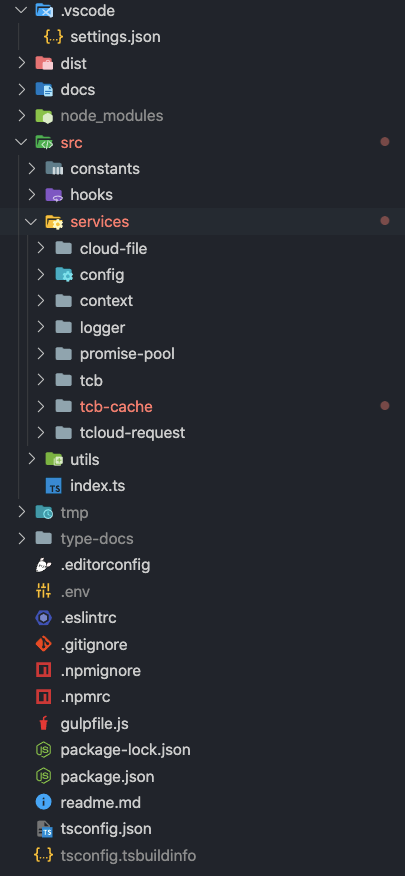
项目结构如上所示:
- contants:存放错误码、默认并发数等常量
- hooks:在sdk的生命周期中运行。例如beforeBootstrapHook 就是运行在sdk被加载时,主要负责注入一些pollyfill、配置第三方插件(dayjs设为亚洲时区)等
- utils:单元函数
- service:各类模块
生命周期钩子
beforeBootstrapHook的代码如下:
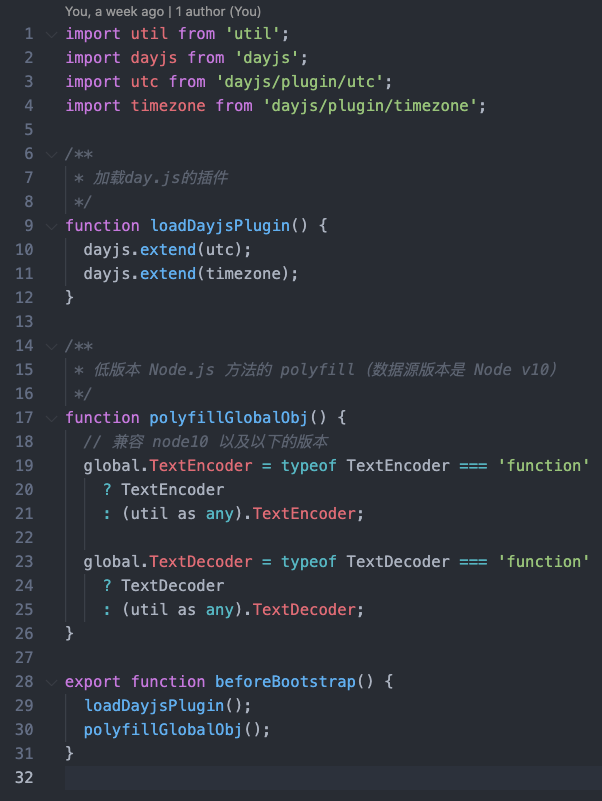
在src/index.ts中引入并调用。
模块开发
交给Ioc管理的模块,需要使用@injectable()声明。例如对于日志模块来说:
1
2
3
4
5
6
7
8
9
10
11
12
13
14
15
16
17
18
19
20
21
import { injectable } from 'inversify';
import { getLocalDayjs } from '../../utils';
import { ILogInfo } from './logger.interface';

@injectable()
export class LoggerService {
  public info(logInfo: ILogInfo) {
    this.print({
      ...logInfo,
      logLevel: 'info',
    });
  }
  private print(logInfo: ILogInfo) {
    const now = getLocalDayjs().valueOf();
    const info = {
      logTime: now,
      ...logInfo,
    };

    console.log(JSON.stringify(info));
 }
如果此模块依赖其它模块,那么按照inversify的规范,有2种方法声明依赖:
@inject()+Symbol声明接口类型- 直接使用 readonly 等标记符来声明
推荐第2种,元信息会被reflect-metadata自动识别并且交给Ioc来实现注入。详情原理见TS实现依赖注入(DI)
1
2
3
4
5
6
7
8
@injectable()
export class CloudFileService {
  constructor(
    private readonly loggerService: LoggerService,
    private readonly tcbService: TcbService,
    private readonly configService: ConfigService,
  ) { }
}
常量模块
inversify支持前面说的提供某个服务的模块。
同时,也支持常量作为模块,此常量可以被其它模块使用,交给Ioc,而不用手动引入。
例如:
1
2
3
4
5
6
7
8
9
10
11
12
13
14
15
16
17
// 常量类型
export interface ILcDatasourceCtx {
  cloudbase: any
}
// 常量标识Type
export const LC_DATASOURCE_CTX_TYPE = Symbol.for('LC_DATASOURCE_CTX');

class LcapContainer {
  private ioc!: Container;

  constructor(params: {
    lcDatasourceCtx: ILcDatasourceCtx
  }) {
    this.ioc = new Container();
    this.ioc.bind<ILcDatasourceCtx>(LC_DATASOURCE_CTX_TYPE).toConstantValue(params?.lcDatasourceCtx);
  }
}
在其它的模块中,如果想使用非class类型的模块(比如常量模块),需要使用前面提到的「@inject()+ Symbol声明接口类型」方法。
例如:
1
2
3
4
5
6
7
8
9
10
11
@injectable()
export class TcbService {
  private lcDatasourceCtx: ILcDatasourceCtx;

  constructor(
    private readonly configService: ConfigService,
    @inject(LC_DATASOURCE_CTX_TYPE) lcDatasourceCtx: ILcDatasourceCtx,
  ) {
    this.lcDatasourceCtx = lcDatasourceCtx;
  }
}
创建容器
由于是作为SDK,所以对外提供了一个容器类。此容器类作用:
- 注入模块:不同的模块使用不同的注入方法
- 提供访问各模块的快捷API
代码如下:
1
2
3
4
5
6
7
8
9
10
11
12
13
14
15
16
17
18
19
20
21
22
23
24
25
26
27
28
29
30
31
32
33
34
35
36
37
38
39
40
41
/**
 * 低码行业模板通用容器
 */
class LcapContainer {
  private ioc!: Container;

  constructor(params: {
    lcDatasourceCtx: ILcDatasourceCtx
  }) {
    this.ioc = new Container();
    this.ioc.bind<ILcDatasourceCtx>(LC_DATASOURCE_CTX_TYPE).toConstantValue(params?.lcDatasourceCtx);

    this.ioc.bind<LoggerService>(LoggerService).toSelf()
      .inSingletonScope();
    this.ioc.bind<ConfigService>(ConfigService).toSelf()
      .inSingletonScope();
    this.ioc.bind<TcbService>(TcbService).toSelf()
      .inSingletonScope();
    this.ioc.bind<TcloudRequestService>(TcloudRequestService).toSelf()
      .inSingletonScope();
    this.ioc.bind<CloudFileService>(CloudFileService).toSelf()
      .inSingletonScope();
    this.ioc.bind<PromisePoolService>(PromisePoolService).toSelf()
      .inSingletonScope();
  }

  /**
   * 获取公共 Service,提供数据源开发常用工具
   */
  get services() {
    return {
      utilService: utils,
      loggerService: this.ioc.resolve(LoggerService),
      configService: this.ioc.resolve(ConfigService),
      tcbService: this.ioc.resolve(TcbService),
      tcloudRequestService: this.ioc.resolve(TcloudRequestService),
      cloudFileService: this.ioc.resolve(CloudFileService),
      promisePoolService: this.ioc.resolve(PromisePoolService),
    };
  }
}
本文由作者按照 CC BY 4.0 进行授权