在Nodejs中使用GraphQL
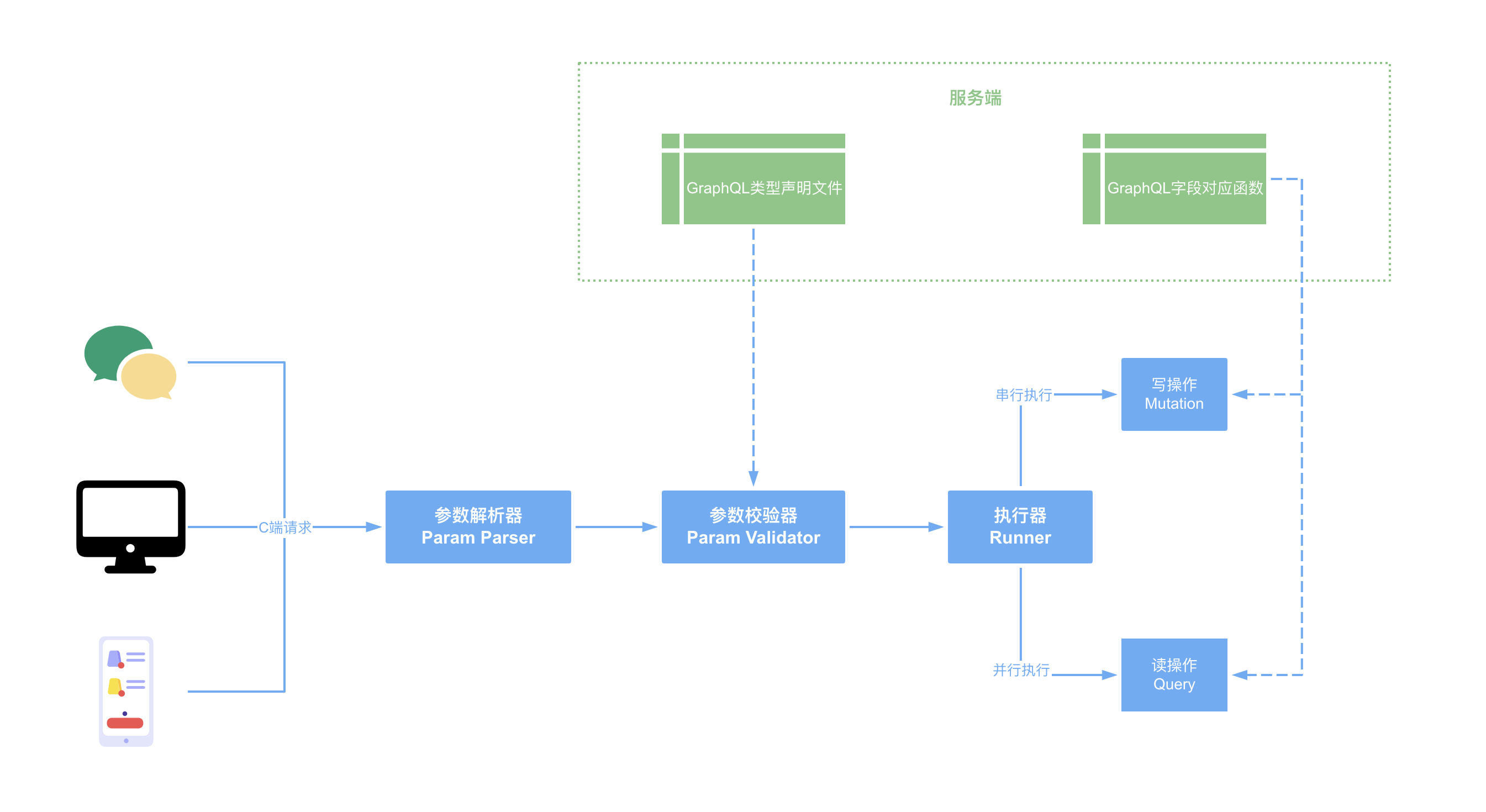
什么是 GraphQL?
它是一种 api 查询语言。使用者按照规范描述数据结构,可以来获取所需数据;开发者需要做的是编写获取数据的响应函数,以及声明查询字段的类型。
GraphQL 的用途
主要用于查询和聚合数据。开发者只需要声明查询字段类型,以及每个字段数据的获取函数。前端通过 graphql 语法,获取自己想要的任何字段。
这样就不需要每个字段或者新的业务模块数据,再开一个 restful api,所有的查询都收到一个接口中。
GraphQL 和 Restful API
最初的时候,很多人觉得是替代 restful api。现在多是和 restful api 配合使用。举 2 个例子。
第一个例子,GraphQL 更多的用于查询和聚合数据,也就是“读”的场景。而更改数据大多数是敏感操作,还会涉及鉴权、缓存、节流等复杂逻辑,一般都封装单独的 restful api 来给前端调用。
第二个例子,GraphQL 以 Restful API 的方式暴露给前端使用。例如在腾讯云 CVM 控制台中,打开 Console -> Network,搜索 graphql 关键字就能看到请求。这个请求就是一个支持 graphQL 查询的 restful API。在实际开发中,可以根据业务模块,抽出不同的支持 graphQL 的 restful api,方便维护;也可以将其放入一个大的 restful api 中。
代码实战
npm 配置文件
1
2
3
4
5
6
7
8
9
10
11
12
13
14
15
16
{
    "scripts": {
        "test": "echo \"Error: no test specified\" && exit 1",
        "dev": "nodemon -e graphql,js ./www.js"
    },
    "author": "dongyuanxin.github.io",
    "license": "ISC",
    "dependencies": {
        "@graphql-tools/graphql-file-loader": "^6.2.7",
        "@graphql-tools/load": "^6.2.8",
        "axios": "^0.21.1",
        "express": "^4.17.1",
        "express-graphql": "^0.12.0",
        "graphql": "^15.5.0"
    }
}
GraphQL 类型声明
对于 graphql,开发需要声明查询字段的类型。例如:
1
2
3
4
5
6
7
8
9
10
11
12
13
14
15
16
17
18
19
20
21
22
23
24
25
26
27
28
29
30
31
32
33
34
35
36
37
38
type User {
    name: String
    age: Int
}

type Duck {
    weight: Float
    color: String
    owner: User
    description(id: String!): String
}

type Query {
    hello: String
    author: User
    # 获取指定用户信息
    # !意思是name不能为空
    getUser(name: String!): User

    # 获取所有用户信息
    # 注意:没有参数的情况,就是普通情况
    getAllUsers: [User]

    getDuck(id: String!): Duck
}

# 输入类型
input UserInput {
    name: String
    age: Int
}

type Mutation {
    # 输入类型必须是input类型
    createUser(userInfo: UserInput): User
    updateUser(userInfo: UserInput): User
}
GraphQL 获取数据函数
规定了数据类型之后,会定义对应的数据字段的获取逻辑。例如:
1
2
3
4
5
6
7
8
9
10
11
12
13
14
15
16
17
18
19
20
21
22
23
24
25
26
27
28
29
30
31
32
33
34
35
36
37
38
39
40
41
42
43
44
45
46
47
48
49
50
51
52
53
54
55
56
57
58
59
60
const userMap = {
    author: {
        name: "author",
        age: 23,
    },
    user1: {
        name: "user1",
        age: 18,
    },
};

const duckMap = {
    0: {
        weight: 1,
        color: "green",
        owner: userMap.author,
        description: ({ id }) => {
            return `I am duck, my info is ${JSON.stringify(duckMap[id])}`;
        },
    },
};

const root = {
    hello: () => "Hello world!",
    author: () => {
        return userMap.author;
    },
    getUser: ({ name }) => {
        return userMap[name];
    },
    getAllUsers: () => {
        const users = [];
        for (let name in userMap) {
            users.push(userMap[name]);
        }
        return users;
    },
    getDuck: ({ id }) => {
        return duckMap[id];
    },

    createUser: ({ userInfo }) => {
        userMap[userInfo.name] = userInfo;
        console.log(">>> invoke createUser mutation");
        return userInfo;
    },
    updateUser: ({ userInfo }) => {
        if (!userMap[userInfo.name]) {
            throw new Error(`Please create user ${userInfo}`);
        }
        userMap[userInfo.name].age = userInfo.age;
        console.log(">>> invoke updateUser mutation");
        return userInfo;
    },
};

module.exports = {
    root,
};
前端传入查询语句,字段会自动匹配根对象对应的函数。下面的查询语句,就会执行 root.hello() 函数,并且返回结果。
1
2
3
query RootQuery {
    hello
}
注意:query 中的字段也可以实现数据更新逻辑,但按照推荐,任何涉及数据更新的改动,都应该放入到 mutation 中。
提供 GraphQL 访问服务
方法 1:通过 buildSchema 直接构建 schema。
1
2
3
4
5
6
7
8
9
10
11
12
13
14
15
16
17
18
19
const { buildSchema } = require("graphql");
const schema = buildSchema(`
type Query {
    hello: String
    name: String
}
`);
const app = express();
app.use(
    "/graphql",
    graphqlHTTP({
        rootValue: root, // root 就是上面的 root 对象
        schema,
        graphiql: true,
    })
).listen(4000, () =>
    console.log("Now browse to http://localhost:4000/graphql")
);
这么写的缺陷就是 graphql 字段声明放在了 js 文件中,编辑器没法高亮+格式化,也不方便单独维护。随着字段增多,js 文件会变得非常冗长。
方法 2:使用 graphql 配套的工具库
这些工具库支持读取 graphql 文件,也支持模块化预发,并且将其加载进来。
例如方法 1 的 GraphQL 类型声明,就可以将其放入root.graphql文件中,然后读取并加载。
1
2
3
4
5
6
const { loadSchema, loadSchemaSync } = require("@graphql-tools/load");
const { GraphQLFileLoader } = require("@graphql-tools/graphql-file-loader");
const schema = loadSchemaSync("./graphql/root.graphql", {
    loaders: [new GraphQLFileLoader()],
});
// ...
编写 GraphQL 查询语句
读的操作都在 Query 中,写的操作都在 Mutation 中。
前端在使用的时候,查询语句如下:
1
2
3
4
5
6
7
8
9
10
11
12
13
14
15
16
17
18
19
20
21
22
23
24
25
26
27
28
29
30
31
32
33
34
35
36
37
38
39
40
# 可以给查询或者变动起一个别名,在可视化运行的时候(/graphql),上方可以选择使用哪个query或者mutation
query RootQuery {
    hello
    getAllUsers {
        name
        age
    }
    getUser(name: "user1") {
        name
        age
    }
    # 注意 如果返回的是对象,那么在大括号内一定要规定需要返回的字段,否则语法报错
    getDuck(id: "0") {
        weight
        color
        # 同理,由于owner类型是User对象,因此这里需要规定返回字段,否则语法报错
        owner {
            name
        }
        description(id: "0")
    }
}

mutation CreateUser3 {
    # 默认不给数据起别名的话,例如最后的updateUser,那么返回的结果会放到updateUser字段中
    # 起别名,才可以触发多个获取数据的函数
    user3: createUser(userInfo: { name: "user3", age: 30 }) {
        name
        age
    }

    user4: createUser(userInfo: { name: "user4", age: 30 }) {
        name
    }

    updateUser(userInfo: { name: "user3", age: 40 }) {
        name
        age
    }
}
其中,mutation 中写操作是串行的,query 中读操作是并发的。可以给 mutation 或者 query 起名字,也可以给返回结果起别名(例如 CreateUser3 中的 user3)。